Prompt Caching for Claude: The Complete 2026 Guide
Anthropic cut prompt-cache TTL from 1 hour to 5 minutes in early 2026. Cache reads cost 10% of base input. Patterns, math, and what changed.
Most guides on Claude prompt caching are already outdated. Anthropic changed the default cache TTL from 1 hour to 5 minutes in early 2026, and simultaneously shifted cache isolation from organization level to workspace level. If your caching setup worked fine in 2025, it may be behaving differently now, more cache misses, broken team cache sharing, higher than expected write premiums.
This guide covers the current state of prompt caching: what changed, how the pricing works, what to cache, and how to structure your traffic patterns to actually capture the savings.
TL;DR
- Anthropic changed the default cache TTL from 1 hour to 5 minutes in early 2026. Most articles online still cite the old TTL.
- Cache reads cost 10% of standard input price, a 90% reduction on cached content.
- Cache writes cost 1.25x (5-min TTL) or 2x (1-hour TTL) standard input price.
- Workspace isolation replaced organization level isolation on February 5, 2026. Team members sharing an org no longer share a cache.
- Combine prompt caching with Anthropic's batch API for up to 95% total cost reduction on non realtime workloads.
What Prompt Caching Is and How It Works
Prompt caching lets you reuse a static prefix, your system prompt, tool definitions, a large reference document, across multiple API requests at a fraction of the normal input price. Instead of sending and processing the same 10,000-token system prompt on every call, Anthropic stores it server side and bills subsequent requests at the cache read price instead of the standard input price.
The mechanism works through cache_control markers in the messages array. You mark the boundary where your static content ends and your dynamic content begins. On the first request, Anthropic processes and stores the prefix. On subsequent requests within the TTL window, it returns the cached result at the read price.
The news hook: Anthropic changed the default TTL from 1 hour to 5 minutes in early 2026. This is the change that broke most teams' existing caching setups. A workload that generates 12 requests per hour with a static system prompt used to hit the cache reliably. With a 5-minute TTL, those same requests hit the cache only if they arrive within a 5-minute window of each other.
The 1-hour TTL is still available, but you pay more for it (2x base input price on the write instead of 1.25x). The shorter TTL is now the default.
The 2026 Changes: 5-Min TTL and Workspace Isolation
Two changes landed in early 2026 that most articles have not covered.
TTL: 1 hour to 5 minutes. The default cache entry expires after 5 minutes of inactivity. Each cache hit refreshes the TTL, so a cache that is actively hit stays warm. But a low traffic workload, a script that runs once every 20 minutes, a batch job that fires every few hours, will miss the cache on almost every request under the 5-minute default. This is the change most developers hit without knowing why their cache hit rates dropped.
Workspace isolation: February 5, 2026. Before this date, cache entries were shared at the organization level. Two developers in the same Anthropic organization with the same API key prefix shared a cache. After February 5, 2026, isolation dropped to the workspace level. Each workspace (a distinct API key context) warms its own cache independently. This change broke team setups that assumed shared cache warming: when Developer A sends the first request, it no longer warms the cache for Developer B. Both developers now pay full cache write prices on their first requests.
The practical implication: any cache hit rate analysis from before February 2026 is measuring a different system.
How Cache Hits and Misses Are Priced
Cache pricing has three states, not two.
Cache read: 10% of the standard input price. On Claude Sonnet 4.6 (priced at $3.00/M input tokens), that is $0.30/M on cached content. This is the savings you are targeting, 90% reduction on the tokens that land in the cache.
Cache write (5-min TTL): 1.25x the standard input price. On Sonnet 4.6, that is $3.75/M. You pay a 25% premium for the first request that stores the cache entry.
Cache write (1-hour TTL): 2x the standard input price. On Sonnet 4.6, that is $6.00/M. You pay a 100% premium for the longer lived entry.
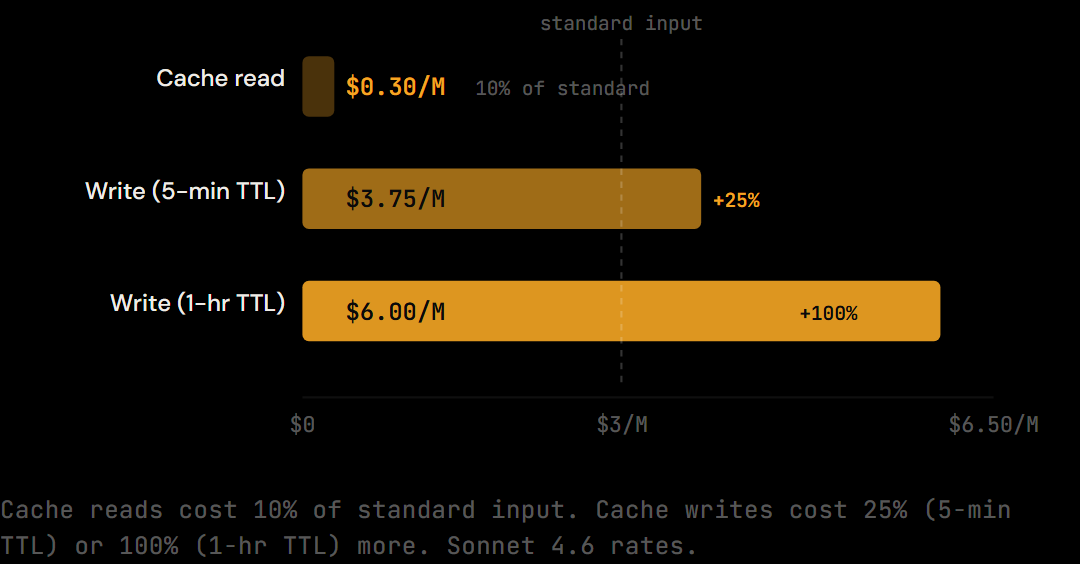
Cache miss / no cache: Standard input price, $3.00/M.
Worked example, 10K-token system prompt, 5-min TTL:
Request 1 (cache write): 10,000 × $3.75/M = $0.0375 (pays the premium, stores the cache)
Request 2+ (cache read): 10,000 × $0.30/M = $0.003 per request
Break even: The first read covers the entire write premium. A single cache hit ($0.003 saved vs $0.0375 premium) is not enough, the break even is roughly:
Break even = cache write cost / (standard price - cache read price)
           = $0.0375 / ($0.030 - $0.003)
           = $0.0375 / $0.027
           ≈ 1.4 reads
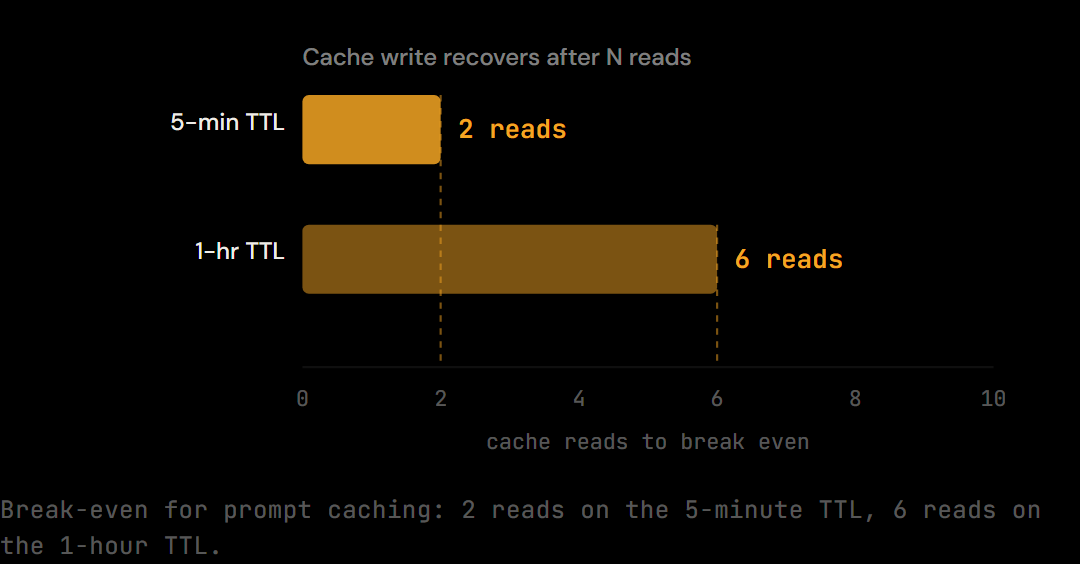
After 2 cache reads, you are ahead. The math is worse for the 1-hour TTL (100% write premium), where break even is roughly 6 reads. For low traffic workloads with rare calls, the 5-min TTL is better even though the cache expires faster, you pay less upfront.
For the full per-request math, see the pricing breakdown details.
What to Cache (Static vs Dynamic)
Prompt caching applies only to the static prefix of your request, content that is byte for byte identical across calls. The split between static and dynamic content is the most important architectural decision in a caching setup.
Cache eligible content:
- System prompts. The most common caching target. If your system prompt is 3,000+ tokens and identical across all requests, cache it. This is where most API heavy applications see the biggest win.
- Tool definitions. A large tool schema (function signatures, descriptions, parameter types) sent with every request is a strong caching candidate. Bundle tool definitions together and place the
cache_controlmarker after the last tool entry. - Large reference documents. A codebase context file, a documentation corpus, a knowledge base, any document you reference repeatedly across requests. The document must be identical on every call to hit the cache.
- CLAUDE.md and project instructions. If you are building on top of Claude Code or a similar workflow, your CLAUDE.md content passes through the API as part of the system prompt on every turn. Caching it eliminates repeated processing charges.
Do not cache:
- User messages. Dynamic by definition, they change on every turn.
- Retrieved just now documents. If you are pulling a document from a database or search result and it changes between requests, it cannot hit the cache.
- Content with timestamps or session IDs. A single character difference between requests, a timestamp appended to the system prompt, a session ID injected per request, breaks the prefix match and forces a cache write instead of a read.
- Tool results. The output of tool calls changes per execution. Keep these outside the cached prefix.
Minimum token thresholds: Caching only activates above a minimum prefix size. For Claude Sonnet 4.6, the minimum is 2,048 tokens. For Claude Opus 4.7, the minimum is 4,096 tokens. Below threshold, the API processes the request normally and does not cache the prefix, even if you include cache_control markers. A system prompt under 2,048 tokens will never generate a cache write on Sonnet.
For more on drawing this boundary, see the static vs dynamic context split.
The 5-Minute Window Strategy
The 5-minute TTL changes the traffic architecture required to maintain a warm cache.
How TTL refresh works: Each cache hit resets the 5-minute clock. If your API calls arrive at least once every 5 minutes, the cache stays warm indefinitely, you pay for the initial write and then read cheaply on every subsequent request. If calls arrive less frequently, the cache expires between hits and you pay for another write on the next request.
Traffic pattern implications:
-
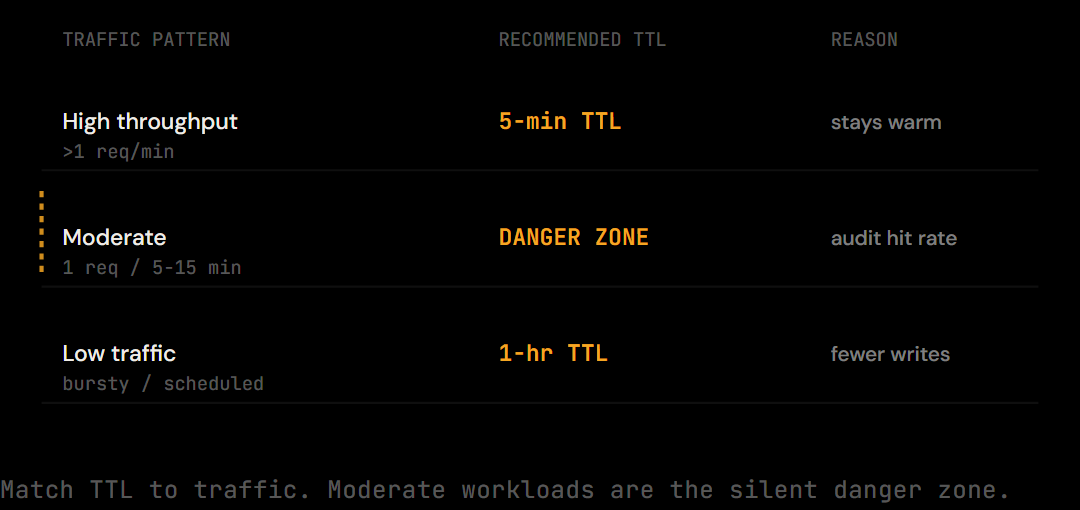
High throughput workloads (>1 request per minute): The 5-min TTL is not a problem. The cache is hit constantly and stays warm. Use the 5-min TTL, pay the smaller write premium, and capture near complete savings on the cached prefix.
-
Moderate workloads (1 request per 5-15 minutes): This is the danger zone. You may be getting cache misses on a significant fraction of requests without knowing it. Check your
cache_creation_input_tokensvscache_read_input_tokensratio in the API response. -
Low traffic workloads (infrequent, bursty, or scheduled jobs): Switch to the 1-hour TTL. Yes, you pay 2x on the cache write, but you avoid paying the write price on every run. For a job that fires once every 30 minutes with a 5,000-token cached prefix, the 5-min TTL generates a cache write every time (30 min > 5 min). The 1-hour TTL generates one write per hour.
Keep alive pings: If traffic is slightly too sparse for the 5-min TTL, a lightweight synthetic request within the 5-minute window maintains the cache. Adds cost and complexity, but it is a valid pattern for latency sensitive systems.
The 1-hour TTL tradeoff: You pay 2x instead of 1.25x on the write. Break even is roughly 6 reads instead of 2. For any workload where you can guarantee 6 reads per hour on a given cached prefix, the 1-hour TTL is worth it despite the higher write cost.
Real Savings Calculation
The math for a team workload makes the value clear.
Scenario: Team running 1,000 Claude Sonnet 4.6 API requests per day with a 5,000-token cached system prompt. Assume 80% cache hit rate after initial warm up.
Cache writes per day: 200 requests × 5,000 tokens at $3.75/M = $3.75
Cache reads per day: 800 requests × 5,000 tokens at $0.30/M = $1.20
Total cached prefix cost: $4.95/day
Without caching, 1,000 requests × 5,000 tokens at $3.00/M = $15.00/day
Savings: 67% on the cached portion. Approximately $300/month.
That $300 is only the savings on the cached 5,000-token prefix. Output tokens and uncached dynamic content still bill at standard rates. But if your system prompt represents a significant fraction of your input token volume, common in document heavy or instruction heavy applications, the savings scale proportionally.
Proxy level request logs show system prompts accounting for 15-40% of total input token volume on typical Claude Code sessions. Teams with detailed CLAUDE.md files and extensive tool schemas sit at the higher end. For a team at 40% system prompt share of input tokens, effective input token savings from caching run 50-60% on that portion alone.
When caching does not pay off:
- System prompts under 2,048 tokens (below Sonnet's cache threshold)
- One shot scripts where each invocation uses a fresh context
- Requests where the "static" prefix changes per request (timestamps, session state injected into the prompt)
- Very infrequent calls with no keep alive strategy and the 5-min TTL
Combining Caching with Batch API (95% Reduction)
Prompt caching and Anthropic's batch API are independent discounts that compound.
The batch API provides a 50% reduction on input and output tokens for non realtime workloads. Requests submitted to the batch API are processed with up to 24-hour turnaround, not suitable for interactive use cases, but ideal for document processing, automated evals, overnight analysis runs, and async pipelines.
Combined math:
Standard input price: $3.00/M After batch 50% discount: $1.50/M After cache read 90% discount on cached prefix: $0.15/M
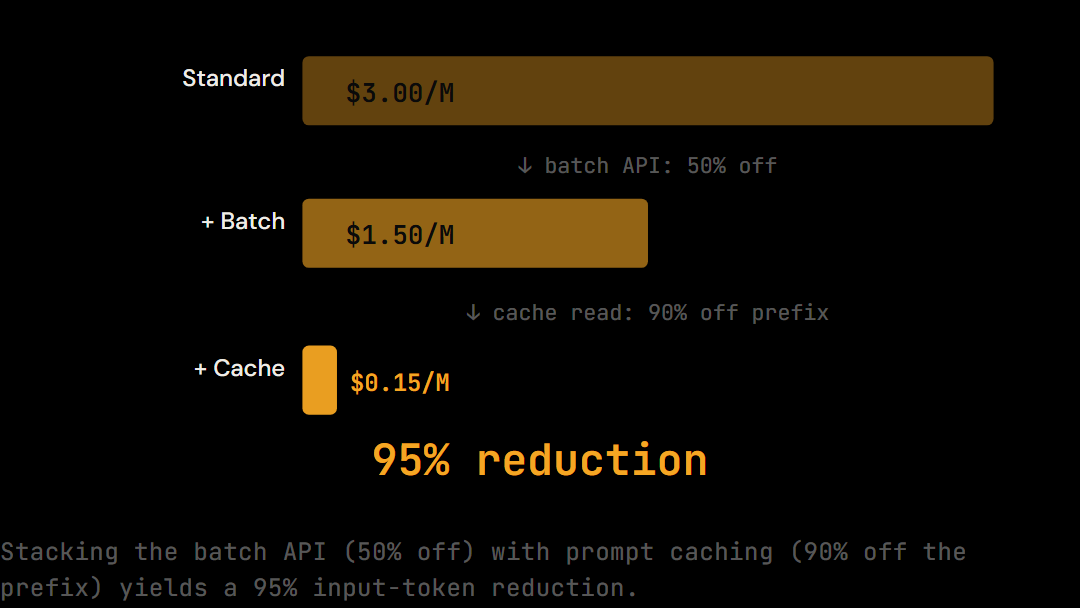
That is a 95% reduction versus uncached, non batched input tokens. Most teams use one or the other. The composition is underutilized, batch processing jobs are exactly the workloads where cached system prompts shine because the same prefix is reused across thousands of documents.
When this applies: Document ingestion pipelines, overnight dataset processing, scheduled evaluations, batch content generation where outputs can wait. The batch endpoint accepts the same request format as the standard API with an added custom_id per request. Cache rules apply identically: same TTL, same workspace isolation, same prefix identity requirement.
For the broader picture, see the cost reduction strategies overview.
Common Mistakes
Seven patterns that prevent prompt caching from working as expected.
1. System prompt under 2,048 tokens. The most common mistake. A short system prompt looks cacheable but never generates a cache write on Sonnet. Add instructions, examples, or tool definitions until you clear the threshold, or check whether caching is worth setting up at all for your use case.
2. Forgetting cache_control markers on the right blocks. The cache only applies to the prefix up to the last cache_control marker. If you place the marker mid system prompt but have additional content after it, the post marker content does not benefit from caching.
3. Assuming 1-hour TTL. This is the most common source of unexpected cache misses since early 2026. The default is now 5 minutes. If you are seeing more cache_creation_input_tokens than expected, the TTL is expiring between requests.
4. Sharing cache across workspaces. Since February 5, 2026, cache entries are workspace scoped. Two separate API keys, even in the same Anthropic organization, do not share a cache. A team with each developer using their own key needs each developer's first request to warm the cache.
5. Caching dynamic content. A single differing character between requests invalidates the prefix match. The most common version: a timestamp or session ID injected into the system prompt. Move all per request dynamic content after the cache_control marker.
6. No traffic during the 5-minute window. A batch job that fires every 20 minutes will miss the cache every time under the 5-min default TTL. Either switch to the 1-hour TTL or restructure to send multiple requests in sequence while the cache is warm.
7. Caching short tool definitions individually. If you have 10 small tool definitions at 100 tokens each, caching them individually is inefficient, each falls below useful size and adds complexity. Bundle them into a single tool schema block above the cache marker.
Diagnosing Poor Cache Hit Rates
Three checks when cache savings are below expectations.
Check 1: Confirm cache tokens appear in API responses.
Anthropic's API response includes usage fields that distinguish cache behavior:
{
  "usage": {
    "input_tokens": 1234,
    "cache_creation_input_tokens": 5000,
    "cache_read_input_tokens": 0
  }
}
If cache_creation_input_tokens is consistently non zero and cache_read_input_tokens is zero, the cache is being written but never read. This points to TTL expiry (requests arriving more than 5 minutes apart) or prefix mismatch (the cached content differs between requests).
If both are zero and you have cache_control markers, you are likely below the minimum token threshold.
Check 2: Verify prefix is byte for byte identical.
The most common source of prefix mismatch is invisible: timestamps, session IDs, or request IDs injected into the system prompt before the cache_control marker. Print the raw string of your cached prefix on two consecutive requests and diff them. A single space difference forces a cache write.
Check 3: Confirm workspace isolation.
Since February 2026, each API key/workspace warms its own cache. A team of 5 developers each using their own API key will see hit rates lower than expected, cache warm up does not propagate across keys.
The most common cache diagnostic finding in proxy level request logs is timestamp injection, developers including a last updated timestamp in their system prompt to signal context freshness, which prevents any cache hits. Remove the timestamp; Claude does not need it to understand the prompt is current.
Caching Plus Compression: Compounding Savings
Prompt caching reduces the cost of the static prefix, your system prompt, tool schemas, reference documents. Once the cache is warm, that prefix costs 10 cents per million tokens instead of three dollars.
The dynamic portion, tool results, file reads, shell output, conversation history, cannot be cached because it changes with every request. That is where context compression operates: duplicate file reads collapsed, verbose tool output trimmed, repeated shell results summarized.
Pair the two and you cut both sides of the input token bill. The static prefix is cached at 10% cost; the dynamic suffix is compressed before it hits the API. Tools like The Distillery implement this at the proxy layer, running automatically on every request without changing your Claude Code workflow.
Frequently Asked Questions
How long does Claude prompt cache last in 2026?
The default cache TTL is 5 minutes as of early 2026. Each cache hit refreshes the 5-minute clock. A continuously active workload can maintain a warm cache indefinitely. The 1-hour TTL is still available but costs more (2x base input price on cache write instead of 1.25x).
Is the 1-hour TTL still available?
Yes. You can specify a 1-hour TTL with a different cache_control type. The tradeoff is cost: the cache write for a 1-hour entry costs 2x standard input price versus 1.25x for the 5-minute default. Break even for the 1-hour TTL is roughly 6 cache reads; break even for the 5-minute TTL is 2 reads. For workloads with traffic gaps longer than 5 minutes, the 1-hour TTL is often the better choice despite the higher write cost.
What's the minimum prompt size to trigger caching?
For Claude Sonnet 4.6, the minimum cached prefix size is 2,048 tokens. For Claude Opus 4.7, the minimum is 4,096 tokens. Below these thresholds, the API processes the request normally without writing a cache entry, even if cache_control markers are present.
Does prompt caching work across team members?
As of February 5, 2026, prompt caches are isolated at the workspace level, not the organization level. Two developers using separate API keys, even in the same Anthropic organization, do not share a cache. Each developer's first request in a session pays the cache write price. If your team uses a single shared API key, cache sharing still works because all requests fall within the same workspace.
How do I check if my cache is being hit?
Look at the usage object in the API response. A cache hit shows a non zero value in cache_read_input_tokens. A cache write (first request, storing the cache) shows a non zero value in cache_creation_input_tokens. If both are zero and you have cache_control markers, your prefix is likely below the minimum token threshold or the prefix content differs between requests.
Try it on your own Claude Code sessions.
The Distillery applies these distillations automatically. Free token optimization, forever.