Context Engineering for Claude Code: The Ultimate 2026 Guide
Accuracy drops over 30% when relevant info sits mid context. The static vs dynamic split, /compact timing, subagent patterns, and token growth curves for Claude Code.
Accuracy drops over 30% when the information Claude needs sits in the middle of a long context window. Not because of a bug. Because of how transformer attention works. You can write perfect prompts and still get degraded results, if your context window is structured wrong.
Context engineering is the discipline that fixes this. Prompt engineering tells the model what you want. Context engineering controls what the model sees when you ask for it.
Martin Fowler's 2026 context engineering article and LangChain's expanding documentation on the topic signal that this concept is moving from advanced technique to standard practice. But most of the existing writing is framework agnostic and focused on RAG pipelines. There is almost nothing written specifically for Claude Code users: how context actually accumulates turn by turn, which tool outputs are the biggest offenders, when to compact, and how to architect projects so sessions stay manageable.
This guide covers all of it.
TL;DR
- Context engineering is what happens in the context window when you prompt, not just what you say.
- For Claude Code users, a 40-turn session can easily reach 60-80K tokens.
- The biggest levers: structuring static content for prefix caching, running
/compactbefore cache expiry, using subagents to isolate exploration, and keeping CLAUDE.md lean. - An automated proxy handles what discipline alone cannot.
What Context Engineering Is (and Why It Matters More Than Prompt Engineering)
Prompt engineering optimizes the message you send. Context engineering optimizes everything else in the window when that message arrives.
The distinction matters because in a long Claude Code session, your latest message is a tiny fraction of the request. The model receives your current question plus every prior message, every tool result, every file read, and the full system prompt, all transmitted again on every single turn. By turn 20, your new message might be 200 tokens inside a 40,000-token request. Whether Claude gives you a useful answer depends less on how you phrased those 200 tokens and more on whether the surrounding 39,800 are well organized and relevant.
Martin Fowler framed context engineering as "the process of structuring information in the context window to maximize model performance." LangChain's context engineering section extends this to include retrieval strategy, cache planning, and what they call the "context budget", treating token capacity as a finite resource to be allocated deliberately. Both frameworks are right. And neither one addresses the specific dynamics of a Claude Code session, where context isn't pulled from a retrieval system but accumulated organically through multi turn tool use.
The Claude Code specific version of context engineering is about understanding what accumulates in a session, why it accumulates, and how to manage it over the course of a working session rather than a single API call.
How Claude Code Context Actually Accumulates in a Session
Most developers think of context as "the conversation so far." The reality is more layered, and the layers accumulate at different rates.
A new Claude Code session starts with a baseline of 1-3K tokens: the system prompt and your CLAUDE.md file. The first user message adds another 200-500 tokens. Tool definitions, file read, bash, search, task, add roughly 500-1K more. You are at 2-5K tokens before a single line of code is touched.
From there, accumulation is driven by tool outputs:
- File reads: Every file Claude reads via the Read tool adds the full file body to context. A 200-line TypeScript file is roughly 600-800 tokens. Claude reads the same file multiple times across a session, each read adds a new copy.
- Shell output: Bash tool results land in context in full. A test run with 50 passing suites produces 2-5K tokens of output. A failed build with a long stack trace can add 3-8K in one shot.
- Conversation history: Every turn carries forward. A verbose back and forth about an architecture decision that happened 15 turns ago is still in the window, re-sent with every subsequent request.
- Tool definitions: Re-sent on every turn. Not a growth item, but a constant 500-1K floor that compounds across a long session.
After 20-30 turns of real work, reading files, running tests, debugging, iterating, a typical session sits at 30-80K tokens. Heavy sessions with large files or frequent bash operations hit the upper end. Sessions that stay focused on a single module and avoid redundant reads sit at the lower end.
Shell output and file reads account for 60-80% of context volume in real Claude Code sessions, based on proxy log data from actual developer workflows. Conversation history is a distant third. The system prompt is constant overhead.
What Eats Your Tokens
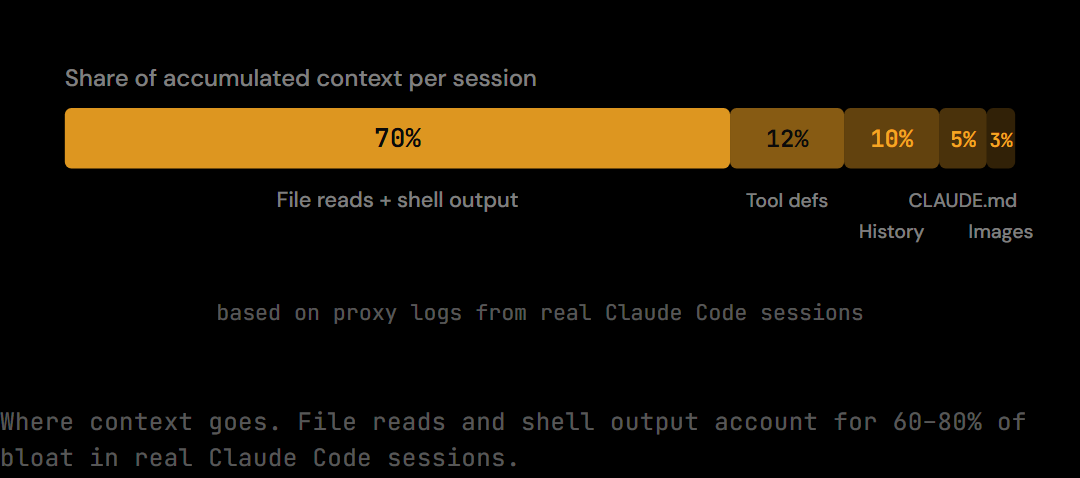
Ranked by contribution to context bloat in typical Claude Code sessions:
-
File reads and shell output (the big one). A single
find . -name "*.ts" -type fon a large monorepo returns thousands of lines. Acatof a large config file persists in context for every subsequent turn. Test runner output, build logs, and grep results are the other major contributors. Together these account for 60-80% of accumulated context in most sessions. -
Tool definitions. Every request re-transmits the full schema for every tool Claude has access to. This is a fixed cost per turn rather than a growing one, but at 500-1K tokens per turn across 40 turns it adds up to 20-40K tokens of cumulative spend.
-
Multi turn conversation history. Every assistant message, every user message, every clarification exchange, all carried forward. A debugging session with ten rounds of "try this... no that didn't work... try this instead" accumulates several thousand tokens of low information density content.
-
System prompt and CLAUDE.md. Static overhead, but constant. A 2,000-token CLAUDE.md re-sent 40 times is 80,000 token turns of overhead. [INTERNAL-LINK: the true cost of CLAUDE.md → /blog/the-complete-claude-md-guide/]
-
Inline images and PDFs. If you're pasting screenshots or PDFs into Claude Code sessions, these can be 10-30K tokens each. They persist for the rest of the session once included.
The pattern is clear: the largest driver isn't what you ask Claude, it's what Claude looks at while answering.
The Attention Distribution Problem (Why More Context Isn't Always Better)
Adding more context doesn't uniformly improve performance. The 2025 needle in a haystack research across multiple transformer models found that every model tested performed worse as input length increased, and the degradation was worst for content placed in the middle of the context.
The core finding: accuracy drops over 30% when the relevant information is in the middle of the context window rather than the beginning or end. This is known as the "lost in the middle" problem, and it holds across model families. Even models that claim to handle long contexts reliably show measurable performance degradation at the midpoint of long inputs.
The mechanism is the U shaped attention distribution. Transformer models reliably attend to content at the beginning (the system prompt and early context) and content at the end (the most recent messages). Content in the middle, including files read several turns ago, tool outputs from earlier in the session, and conversation history from the first half of a long debugging session, receives disproportionately less attention.
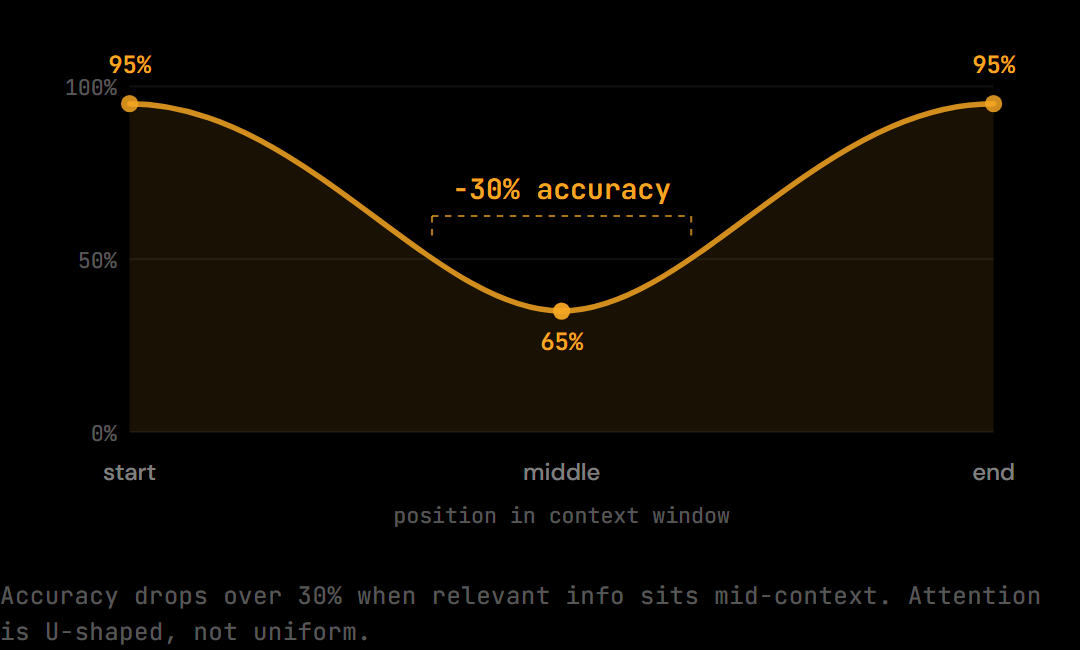
Anthropic's research on context utilization echoes this finding. More tokens in the window does not mean more information available to the model. It means more information competing for attention, with the competition systematically disadvantaging middle window content.
The practical implication for Claude Code: if the file Claude needs to reference was read 20 turns ago and sits in the middle of an 80K-token context, the answer you get will be less accurate than if that file were in the most recent 10K tokens. This is not about Claude making mistakes, it is about how attention works in transformers. Context engineering addresses it structurally.
Static vs Dynamic Context: What Goes Where
The prefix caching model distinguishes two types of context: static content that doesn't change between turns, and dynamic content that varies. Getting this separation right has both performance and cost implications.
Static context (cacheable):
- System prompt
- Tool definitions and schemas
- CLAUDE.md and project instructions
- Project README sections loaded at session start
- Any preamble or shared reference material
Dynamic context (variable suffix):
- Current user message
- Recent tool outputs
- Retrieved documents relevant to the current task
- Active file content for the operation at hand
The principle: static content goes at the front of the request, dynamic content at the back. When static content is stable and placed at the beginning of the messages array, Anthropic's prefix caching can save that section and avoid re-billing it on subsequent turns. Dynamic content at the back gets computed fresh each turn, which is correct, since it's the part that's actually changing.
[INTERNAL-LINK: how prefix caching works and what it costs → /blog/prompt-caching-claude-complete-guide/]
When developers load large files or long search results into the middle of a conversation, they break the static/dynamic separation. The cached prefix effectively ends at the injection point, and subsequent turns have to re-process more context. Beyond the caching cost, injecting large chunks into the middle of a session is exactly the pattern that triggers the attention distribution problem described above.
The practical rule: surface large reference documents early in the session if they'll be needed throughout, or surface them immediately before the turn that needs them (as dynamic suffix), not somewhere in the middle.
A related pattern worth noting: if you need to load a large reference file (a schema, a design doc, an API spec), load it in the first few turns rather than the middle of the session. Loading it at the start places it in the well attended beginning of the context. Loading it at turn 30 places it in the middle of an already large window, exactly where attention degrades. The content is the same; the attention it receives is not.
The /compact Strategy: When to Run It and Why Timing Matters
/compact is Claude Code's built in context reset. It summarizes the session so far and replaces the accumulated history with a condensed representation, freeing up context budget for continued work. Used well, it's the most powerful manual context engineering tool available.
The timing of /compact matters more than most developers realize.
Run it after 50 turns or when context approaches 70K tokens. At 50 turns you are well into the zone where context bloat is degrading attention quality, and early enough that the compacted summary retains sufficient detail. Waiting until the context window is nearly full means compacting a poorer signal.
Run it while the cache is still warm. Prefix caching has a TTL, since early 2026, the default TTL is 5 minutes. If you wait until cache entries have expired before running /compact, you're effectively giving up the caching benefit of the session's static prefix. Compact while the session is still active and cache warm.
Compact at unit of work boundaries. Don't compact mid implementation. Finish the function, finish the failing tests, finish the bug fix, then compact. A context that ends cleanly with "function X is complete and tests pass" produces a much better summary than one that ends mid debugging. The compact summary is what the next phase of work will have to build on.
Real Claude Code sessions show a clear pattern: sessions that compact at natural boundaries (completed feature, passing tests, resolved bug) maintain quality through turn 80-100. Sessions that compact mid task or that skip compacting until the context is nearly exhausted show degraded output quality in the second half. The compacted summary needs to answer "what did we accomplish" cleanly, a mid task compact produces an incomplete answer.
What compact preserves and what it discards. The compact summary retains: decisions made, approach taken, files modified, tests written, and current state. It discards: the exploration, the dead ends, the back and forth, and the verbose tool outputs. This is the right tradeoff. The exploration served its purpose, the decisions are what matter going forward.
How compact interacts with prefix caching. When you run /compact, the new condensed session starts with a fresh messages array. The cached prefix from the original session (the static system prompt and tool definitions) may still be warm and will be reused automatically. The compacted summary becomes the new "beginning" of context. Structuring the compacted session correctly, static content first, then the compact summary, then new dynamic content, restores the prefix caching benefit even after a reset. If you compact and immediately send five rapid messages, the cache warms back up quickly and the prefix savings resume. [INTERNAL-LINK: prompt caching TTL and how to maximize hit rates → /blog/prompt-caching-claude-complete-guide/]
Subagent Patterns for Context Isolation
Subagents are the most underused context engineering tool in Claude Code. Most developers use them for parallelism. The more powerful use is context isolation.
When Claude Code spawns a subagent via the Task tool, the subagent runs in its own separate context window. The main conversation doesn't see the subagent's exploration, its intermediate tool calls, or its accumulated file reads. It receives only the subagent's final output: a summary, a result, a list.
This is context isolation by design. And it's extremely powerful for certain patterns:
Codebase reconnaissance. "Go find all the places where X pattern is used." The subagent reads through dozens of files, accumulates 30-40K tokens of exploration, synthesizes the answer, and returns a 300-token summary. The main conversation gains the knowledge without the context cost.
Multi file analysis. "Read these 12 files and tell me which ones have the database connection pattern." Subagent handles the reads. Main conversation gets the filtered list.
Finding all callers of a function. Cross file reference hunting is expensive in tokens and often not directly relevant to the current implementation task. A subagent handles the investigation; the main conversation gets the answer.
Exploratory debugging. When you're not sure what's wrong, the debugging exploration itself (reading logs, tracing call stacks, testing hypotheses) can consume enormous context. A subagent can do the investigation, conclude "the bug is in module X, line 47, because of Y", and return that conclusion to the main conversation without carrying forward all the dead ends.
The rule of thumb: if the task involves "go figure out X" rather than "implement X", that's a subagent candidate. The exploration should happen in an isolated context. The conclusion is what belongs in the main session.
One additional pattern: subagents also help when you need to run the same type of investigation on multiple targets simultaneously. Instead of sequentially reading 12 configuration files in the main context (accumulating 12K+ tokens of file content), spawn parallel subagents to read groups of files and return structured summaries. The main conversation receives four 200-token summaries instead of 12 full file reads. The total information gain is similar; the context cost is a fraction of the sequential approach.
Project Architecture That Minimizes Context Bloat
Good context engineering starts before the session opens. How you structure a project determines the baseline token cost of working in it.
Use symbol navigation over full file reads. Tools like Serena's find_symbol and get_symbols_overview return structured summaries of a file without loading the full content. Reading a 400-line TypeScript file to find one function's signature is 1,200 tokens. Getting that function's body directly is 100-200 tokens. At 30 such reads per session, the difference is 30K tokens, most of it from content Claude never needed.
Keep CLAUDE.md lean. CLAUDE.md is re-sent every turn. A 3,000-token CLAUDE.md across a 50-turn session is 150,000 token turns of overhead. A 400-token CLAUDE.md is 20,000. Structure it as a concise reference, conventions, critical paths, key constraints, not a project diary. [INTERNAL-LINK: how to write a lean, effective CLAUDE.md → /blog/the-complete-claude-md-guide/]
Subdirectory CLAUDE.md for monorepos. Rather than one enormous CLAUDE.md that covers every package, use a root CLAUDE.md for project wide conventions and per package CLAUDE.md files for package specific rules. Claude Code loads the cascade relevant to the current working directory. A session focused on the API package loads root + API instructions, not root + frontend + API + CLI.
Prefer focused reads over directory scans. A find . -type f -name "*.ts" on a large monorepo can return thousands of paths. If you need three specific files, ask Claude to read those three files directly. The directory scan result persists in context for every subsequent turn, it's a one time cost for information you likely only needed once.
Avoid copy pasting large outputs into messages. When you paste a long error log, stack trace, or log file directly into a message, it enters the context as a full user message and stays there. A bash tool call produces the same content but is slightly easier for the model to treat as a distinct tool result. More importantly, the optimization pipeline can compress tool results before forwarding, raw user messages are harder to target.
CLAUDE.md as Part of Your Context Engineering Stack
CLAUDE.md is the most expensive piece of context per token because it pays a compounded cost. Every token in CLAUDE.md is re-sent on every turn of every session. A 2,000-token CLAUDE.md in a 40-turn session costs the same as an 80,000-token file read in a single turn.
The context engineering implication is clear: CLAUDE.md optimization has a multiplier effect that no other context improvement has. Cutting CLAUDE.md from 2,000 to 400 tokens saves 64,000 tokens per 40-turn session. Cutting a single file read by 1,600 tokens saves 1,600 tokens once.
The target for real projects: under 600 tokens for the active section of CLAUDE.md. That's 3-4 focused sections covering the rules that matter most. It is not a project wiki. Session specific context, current task state, open decisions, files being edited, belongs in a separate notes file, not in CLAUDE.md.
[INTERNAL-LINK: the complete guide to writing an effective CLAUDE.md → /blog/the-complete-claude-md-guide/]
Real Session Token Growth Curves and Optimization Benchmarks
From The Distillery proxy logs, real Claude Code sessions follow predictable growth curves depending on session type and discipline.
Unoptimized session (40 turns): Starts at 5K tokens, grows to 70-80K by turn 40. Growth rate accelerates in the first 20 turns as file reads and tool outputs accumulate, then moderates as the context approaches a steady state of repeated content. The token growth curve is exponential through turn 20 and roughly linear through turns 20-40. Cost at $3/M input tokens (Sonnet) across the full session: approximately $0.85-1.00.
With /compact discipline (40 turns): Compact at turn 20 resets context to 8-12K. By turn 40 the session is back to 25-30K. The token growth curve shows a sawtooth pattern at compact points rather than continuous growth. Total session cost: approximately $0.40-0.55.
With /compact and subagent isolation (40 turns): Heavy exploration tasks handled via subagents. Main conversation context stays tighter. Peak of 18-22K at compact point, 15-18K by turn 40. Token growth curve stays nearly flat after the first 15 turns. Session cost: approximately $0.28-0.40.
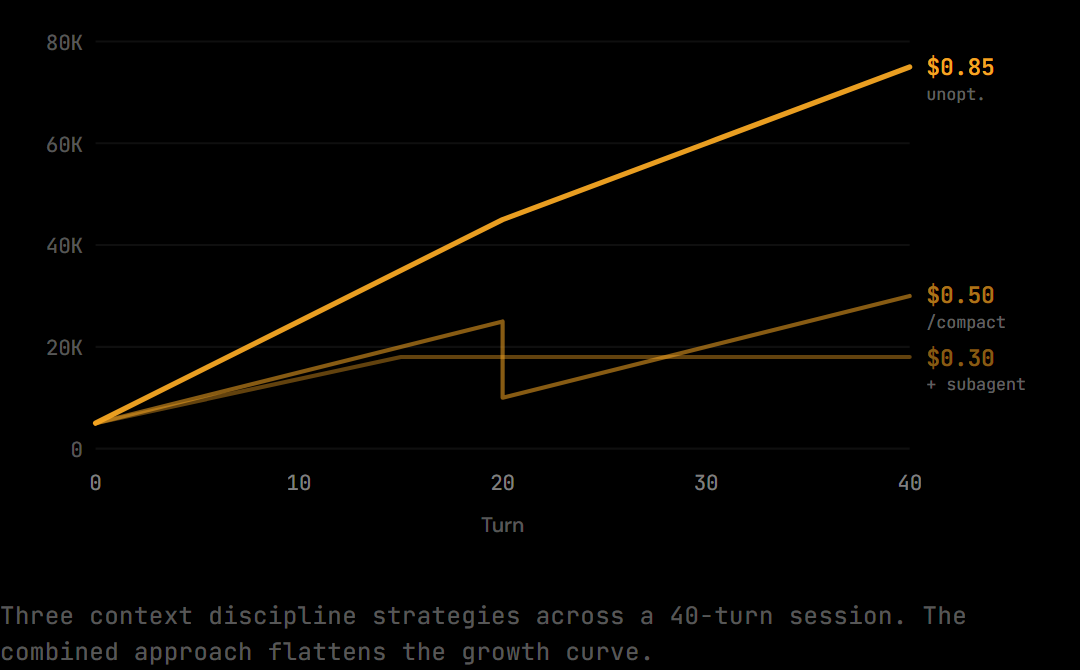
Adding an automated compression layer: A proxy that compresses shell output, diffs, and search results before they enter the context reduces effective token count by 30-60% on those specific content types, compounding the savings from /compact and subagent discipline. Combined, the three approaches, manual context discipline, subagent isolation, and automated compression, produce a fundamentally different token growth curve: one that flattens rather than steepens as the session progresses.
[INTERNAL-LINK: how token counting works and what it costs → /blog/true-cost-of-claude-code-for-teams/]
The difference between an optimized and unoptimized session over a month of daily work is significant. At 200 sessions per month, $0.50/session saved across the board is $100/month on input tokens alone, before any model level optimization.
The Distillery as an Automated Context Engineering Layer
Most context engineering is manual. Keeping CLAUDE.md lean, timing /compact, using subagents for exploration, all of it requires deliberate habits maintained consistently across every session. The discipline pays off, but the savings are only as reliable as the developer who applies them.
The Distillery sits on the wire between Claude Code and the Anthropic API and handles the parts that manual discipline cannot. Shell output, diffs, and search results are compressed before they enter the context window. Duplicate file reads are collapsed to a single appearance. Verbose stack traces are distilled to their essential error content. These are exactly the categories that account for 60-80% of context bloat, and they're the categories that accumulate invisibly, turn by turn, without any obvious signal to the developer that compression would help.
The combination of manual context engineering and automated proxy compression is more effective than either alone. Manual discipline handles the structural decisions: what scope to open, when to compact, which tasks to isolate. The proxy handles the content decisions: how much of each tool result to forward, whether this file read is a duplicate, whether this bash output can be distilled. Compound both, and you get the flat token growth curve rather than the exponential one.
Frequently Asked Questions
What's the difference between context engineering and prompt engineering?
Prompt engineering optimizes the specific message you send to the model. Context engineering optimizes everything else in the context window when that message arrives: the system prompt, prior conversation history, tool results, and file content. In a long Claude Code session, your new message might be less than 1% of the total tokens in the request. Prompt engineering improves that 1%. Context engineering improves the other 99%.
When should I run /compact in Claude Code?
Run /compact after approximately 50 turns or when the context reaches 60-70K tokens, whichever comes first. Time it at natural unit of work boundaries, after a function is complete, tests are passing, or a bug is resolved. Avoid compacting mid implementation. Also run it while the prefix cache is still warm (within 5 minutes of the last request) to avoid losing the caching benefit of the session's static prefix.
How big is a typical Claude Code context window?
Claude Sonnet 4.6 has a 200K token context window. In practice, most Claude Code sessions hit meaningful attention degradation well before the technical limit, the "lost in the middle" problem appears at much smaller window sizes. Plan for context quality to degrade starting around 60-80K tokens, not 200K. The technical limit and the practical performance limit are not the same number.
Do subagents share context with the main conversation?
No. A subagent spawned via the Task tool runs in its own isolated context window. The main conversation does not see the subagent's intermediate tool calls, file reads, or reasoning steps. It only receives the subagent's final output, whatever the subagent returns as its result. This isolation is the primary reason subagents are useful for context engineering: exploration happens in a throwaway context, and only the conclusion carries forward.
How do I see my current context usage?
Claude Code does not expose a live token counter in the UI. The best proxy is the turn count: after 30-40 turns with active file reading and tool use, assume you're in the 40-70K range. If responses start feeling less precise or Claude starts asking clarifying questions about things it seemed to know earlier in the session, that's a practical signal that context quality is degrading and a compact is overdue. An instrumented proxy like The Distillery reports exact token counts per request in real time.
Try it on your own Claude Code sessions.
The Distillery applies these distillations automatically. Free token optimization, forever.