DISTILLERY_BYPASS: The One Env Var That Gives You Full Control
DISTILLERY_BYPASS turns off all optimization with no warning. The #1 reason developers see no savings. How to check, unset, and verify.
There is one env var that completely bypasses The Distillery. Most developers set it once and forget they set it. Then they wonder why their bill didn't change.
DISTILLERY_BYPASS tells The Distillery to pass requests through to Anthropic without any distillation or optimization. The proxy runs, accepts connections, and forwards, but does nothing in between. Your tokens hit the API unmodified.
This is intentional behavior. There are legitimate reasons to bypass optimization. But it is also the single most common reason why developers install The Distillery, see no savings, and conclude it is not working.
TL;DR
DISTILLERY_BYPASSset to any non empty value disables all distillation. The proxy becomes a transparent passthrough.- Bypass is binary, there is no partial bypass mode and no per stage opt out.
- Legitimate uses: debugging unexpected behavior, establishing pre optimization baselines, one off sessions that need full context, reproducing issues for bug reports.
- Forgotten bypass is the #1 reason developers see no savings. Always check
echo $DISTILLERY_BYPASSfirst when investigating low reduction. - Unsetting requires both
unset DISTILLERY_BYPASSin the current shell AND removing the line from any shell profile that re-exports it on login.
What DISTILLERY_BYPASS Does
When DISTILLERY_BYPASS is set to any non empty value, the proxy skips all context analysis and distillation. Requests flow through unmodified. The effect is binary: either the full optimization pipeline runs, or no pipeline runs at all. There is no partial bypass mode, no way to bypass one stage and apply another, and no warning when the variable is set.
# Enable bypass mode
export DISTILLERY_BYPASS=1

# Disable bypass mode
unset DISTILLERY_BYPASS
The proxy does not need to restart when the variable changes. It reads the environment on each request.
When to Use It
Four legitimate scenarios call for bypass mode: debugging unexpected Claude behavior to rule out the proxy as a factor, benchmarking pre optimization baseline cost for comparison, one off sessions where the full context must reach the model unchanged, and reproducing specific behavior for bug reports. Each is bounded, bypass mode is a temporary tool, not a default state.
Debugging. If something in your Claude Code session is behaving unexpectedly and you want to rule out The Distillery as a factor, set DISTILLERY_BYPASS=1 and run the session again. If the behavior changes, The Distillery's distillation is affecting the output. If it does not change, the issue is elsewhere.
Benchmarking. If you want to measure what your sessions actually cost without optimization, to establish a baseline before comparing to distilled costs, bypass mode gives you the raw numbers. Run a representative session with bypass on, check the token count, then run it again with bypass off. The difference is your actual savings.
One off sessions. Occasionally you may have a session where you explicitly want the full context to reach the model unchanged. Complex debugging scenarios, sessions where you are feeding the model large amounts of structured data and need every byte to arrive verbatim, or situations where you are working with a partner who needs to see the exact requests you are sending. Bypass mode lets you opt out for a single session without changing any configuration.
Reproducing a Distillery issue. If you are filing a bug report or trying to reproduce a specific behavior, bypass mode helps isolate whether the issue is in the proxy or upstream.
CI/CD pipelines. If your team runs Claude Code inside a CI pipeline for automated code review or documentation generation, the proxy should generally be active. However, there is one narrow case where bypass makes sense: establishing a token count baseline in a scheduled job that is specifically designed to measure unoptimized usage. In that job, set DISTILLERY_BYPASS=1 as an explicit environment variable in the pipeline configuration (not inherited from the host), run the job, record the raw token count, then compare against a second job with bypass off. The two runs give you a reproducible cost delta tied to real CI tasks rather than benchmark fixtures. Outside of this measurement use case, bypass should not be set on CI jobs that use the proxy for production optimization, the savings are highest on the long running agentic tasks that pipelines often execute.
How to Check If It Is Set
The most common scenario where bypass mode silently kills savings: a developer enables it during a debugging session, forgets to unset it, and runs weeks of undistilled Claude Code traffic without realizing. The proxy accepts connections normally, Claude Code behaves normally, only the bill stays at pre optimization levels. Always check echo $DISTILLERY_BYPASS first when investigating unexpectedly high costs.
Check whether the variable is set:
echo $DISTILLERY_BYPASSIf this prints a value, bypass mode is active. If it prints nothing, it is not set.
You can also check all Distillery related env vars at once:
env | grep DISTILLERYThis will show DISTILLERY_BYPASS, DISTILLERY_PORT, and any other Distillery variables you have set.
How to Unset It
Unsetting bypass mode requires two steps: clearing it in the current shell with unset DISTILLERY_BYPASS, and removing any persistent re-export from a shell profile (.bashrc, .zshrc, .bash_profile, .profile). Without the second step, the variable returns to active state on the next terminal launch.
unset DISTILLERY_BYPASSIf you set DISTILLERY_BYPASS in your shell profile (.bashrc, .zshrc, or similar), unsetting it in the current session will not persist. The next time you open a terminal, bypass mode will be active again. You need to remove or comment out the line from the profile file.
Find it:
grep -r DISTILLERY_BYPASS ~/.bashrc ~/.zshrc ~/.bash_profile ~/.profile 2>/dev/nullThen edit the relevant file to remove the export DISTILLERY_BYPASS=... line.
The Billing Impact
A bypassed session costs the same as a session running without The Distillery at all. The proxy is running, but it is not reducing anything. For a developer running 160 sessions per month on Sonnet at the standard $480/month baseline, bypass mode means the full $480 hits the bill, with the expected 40% savings ($192/month) lost. Annualized, that is $2,304 of forgone savings on a single developer.
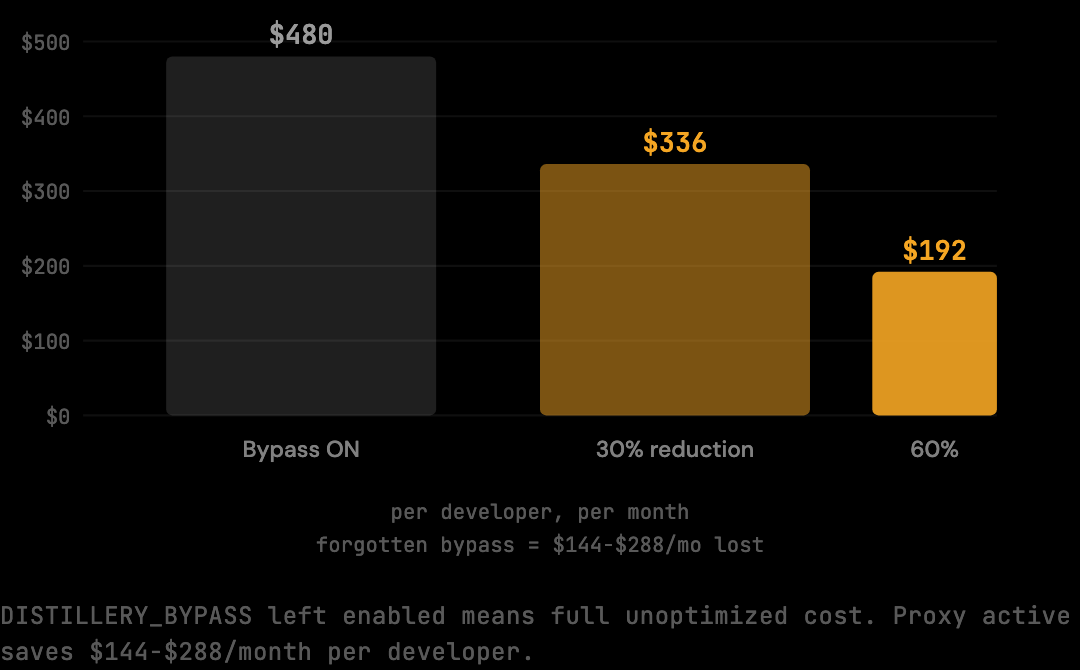
This is the reason the env var is worth knowing about explicitly. It is the only configuration state that silently eliminates your savings without generating any errors or warnings. Everything appears to be working. The proxy accepts connections. Claude Code behaves normally. The bill tells a different story.
Other Distillery Env Vars
DISTILLERY_BYPASS is the most consequential, but it is not the only env var:
DISTILLERY_PORT: overrides the default proxy port (3080). Useful if port 3080 is already occupied on your machine.ANTHROPIC_BASE_URL: the variable Claude Code reads to route requests to the proxy. This is not a Distillery variable, but it is the one you set to activate routing. If this is not set correctly, requests bypass the proxy entirely (not because ofDISTILLERY_BYPASS, but because they never reach The Distillery).
If your savings look lower than expected, check DISTILLERY_BYPASS first. If that is not set, verify that ANTHROPIC_BASE_URL is pointing to the correct address and port.
Verifying That the Proxy Is Actually Optimizing
Beyond checking the bypass variable, two additional checks confirm the optimization is running. Both are quick and surface different failure modes that a single check would miss.
The first check is whether requests are reaching the proxy at all. With the proxy running, send a Claude Code request and check the proxy logs (tail -f ~/.distillery/proxy.log or whatever the configured log path is). If no request appears, ANTHROPIC_BASE_URL is misconfigured and Claude Code is talking to Anthropic directly. The bypass variable is irrelevant in this case because the proxy never sees the traffic.
The second check is whether the optimization is producing reduction. Run thedistillery stats after one or two real sessions. The output reports per session raw and optimized token counts. If optimizedTokens equals rawTokens, no reduction is happening, most likely because bypass is active. If optimizedTokens is meaningfully smaller than rawTokens, the pipeline is working.
Together, these checks distinguish between "proxy not receiving traffic" and "proxy receiving traffic but bypassed," which require different fixes. Mixing them up is the most common cause of failed troubleshooting sessions.
Common Misuse Patterns
Three patterns of misuse appear regularly in support questions and developer forums. Recognizing them shortens debugging time when bypass mode is suspected.
The first is leaving bypass active across project switches. A developer enables bypass to debug behavior in project A, switches to project B without unsetting it, and runs unmodified traffic for the entire project B work. The bill at month end reflects project B's full unoptimized cost despite the developer believing the proxy was active.
The second is shell profile contamination. A developer copies a snippet from documentation that includes export DISTILLERY_BYPASS=1 (typically a debugging example) directly into their shell profile. Every new terminal session starts with bypass enabled. The fix is to remove or comment out the line; merely unsetting in the current shell does not help.
The third is treating bypass as a graceful degradation mode. The proxy already handles failures gracefully on its own, if a distillation stage encounters an error, it falls back to the unmodified content for that stage rather than failing the request. There is no reason to set bypass as a "safety" measure. The pipeline is fail safe by design; bypass is for explicit opt out, not error recovery.
Frequently Asked Questions
Q: Does the proxy log requests when bypass is active?
The proxy still logs raw token counts when bypass is active. It cannot log optimized counts because no optimization runs. The per session stats with bypass active show rawTokens equal to optimizedTokens, which is a clear signal that distillation is not happening on those sessions.
Q: Can I bypass for a single Claude Code request without affecting others?
Not natively. The bypass is per process: the proxy reads DISTILLERY_BYPASS from its environment, and it applies to every request handled by that proxy instance for as long as it is set. To bypass a single request, run the request with DISTILLERY_BYPASS=1 prepended to the command, then unset it for subsequent work. Or run a second proxy instance with bypass enabled and route the specific session to it.
Q: What value should DISTILLERY_BYPASS be set to?
Any non empty value enables bypass: 1, true, yes, anything that is not the empty string. The proxy checks for "is this variable defined and non empty," not a specific value. To disable, use unset DISTILLERY_BYPASS rather than setting to empty string, which can behave inconsistently across shells.
Q: Will the proxy refuse to start in bypass mode?
No. The proxy starts normally and accepts connections. The only difference is that the optimization pipeline does not run on incoming requests. From outside, the proxy looks identical to a fully active proxy, same port, same response patterns, same logs. The difference is only visible in the per session stats showing zero reduction.
Q: Is there a recommended workflow for handling bypass during debugging?
Set bypass at the command line for the specific debugging session rather than in the shell profile: DISTILLERY_BYPASS=1 claude-code .... This scopes the bypass to that one command. When the command exits, the variable goes out of scope. There is no risk of forgetting to unset it later because it never persists beyond the single invocation.
Install The Distillery if you have not already, or check the benchmark page to see what the reduction looks like on a realistic session corpus.
Try it on your own Claude Code sessions.
The Distillery applies these distillations automatically. Free token optimization, forever.